Welcome to mpl_trajectory’s documentation!
mpl_trajectory helps to plot particle trajectories as animations in matplotlib. It can show show 3D trajectories by using the third axis as colour. It can output a static graph or animation of the trajectories.
Indices and tables
Install
You can use pip
pip install mpl-trajectory
Jupyter Notebook
You can run
%matplotlib qt
The graph will pop up in a window
Or
%matplotlib notebook
This will make the animation or graph appear in the cell bellow.
Saving
If you want to save animations you must have ffmpeg for your system.
Code Documentation
Created on Tue Aug 4 12:42:20 2020
@author: Mark
-
mpl_trajectory.combine(step, *cords)¶ Combines two or more arrays together
Parameters: - step (int) – The size of the step taken.
- *cords (turple of array) – The arrays to be combined
Returns: Combination of array
Return type: Array
Examples
>>> combine(2,[1,2,3,4,5,6],[1,2,3,4,5,6])
[[1, 1],[3, 3],[5, 5]]
>>> combine(1,[1,2,3,4,5],[5,4,3,2,1], [1,1,2,1,1])
[[1, 5, 1], [2, 4, 1], [3, 3, 2], [4, 2, 1], [5, 1, 1]]
-
mpl_trajectory.frame_number(frame, speed, particles)¶ Creates the text for the animation, called every frame to get the text to be displayed.
Can have your own text the function must have the same input and output variables as this one.
The first line to be run is pos = frame*speed to get the current position of the data to be viewed
Parameters: - frame (int) – The frame number of the animation.
- speed (int) – The number of cords jumped per frame
- particles (object) – An object which contains all the particles data
Returns: The text to be displayed for a given frame
Return type: str
-
class
mpl_trajectory.trajectory(name='My_Trajectory', cmap=<sphinx.ext.autodoc.importer._MockObject object>)¶ Array with associated photographic information.
-
name¶ The name given to the simulation, used in saving for file name.
Type: string
-
cmap¶ The colour map to use as the 3rd axis, a list of supported cmaps can be found at https://matplotlib.org/3.3.0/tutorials/colors/colormaps.html
Type: cmap
-
Particles¶ Stores the information for the trajectories and particles.
Type: Array of objects
-
Clear()¶ Clears all the particle trajectory data
-
ShowAnimation(size=15, follow_mass=-1, save=False, link_data=[], z_axis=[-15, 15], with_color=False, max_dots=150, speed=4, setup=False, text=[<function frame_number>])¶ This function creates an animation, plot3D must be used first to obtain the trajectory data.
Parameters: - size (float, optional) – The distance from the centre of the graph in the x,y plane. The default is 15.
- follow_mass (int, optional) –
(-3 = The camera remains static)
(-2 = The camera follows the largest mass)
(-1 = The camera follows the centre of mass of the system)
(0,1,2, n-1 = The camera follows that particle)
The default is -1.
- save (boolean, optional) – Save animation as a mp4 video, requires ffmpeg. The saved name will be the name of self.name The default is False.
- link_data (Array, optional) –
links particles together with a line.
0 means origin
i means particle i
examples
[[0,0]] line drawn between origin and origin(thus no line)
[[0,1],[1,2]]
a line drawn from origin to particle 1 and a line drawn from 1 to 2
The default is [].
- z_axis (Array, optional) – The colour range of the z_axis. The default is [-15, 15].
- with_color (boolean, optional) – If true, it will use colour as a 3rd axis (z-axis), a colour bar will appear as well. The default is False.
- max_dots (int, optional) – When plotting with colour tells the program how many dots can be rendered for all the tracks, the more dots the more laggy the animation becomes. When saving the animation lag isn’t a problem but the more dots there are the more space it will take up. The default is 150.
- speed (int, optional) – Has to be an integer, pos = frame*speed, where pos tells what section to use for the position of a particle for a given frame. The default is 4.
- setup (boolean, optional) – Run a standard setup, in this case it is just making the plots use a darkstyle background. The default is False.
- text (array, optional) – This is used to display changing text in the animation, by following the same structure as the frame_number function, one can create a string to return. All the functions in the list will be called every frame. The default is [frame_number].
-
ShowStatic(with_color=False, z_axis=[-15, 15], save=False, s=12, setup=False)¶ Plots a normal matplotlib graph of the trajectories.
Parameters: - with_color (bool, optional) – Plots with the z-axis as colour . The default is False.
- z_axis (array, optional) – The colour range of the z_axis.. The default is [-15,15].
- save (bool, optional) – Saves the graph. The default is False.
- s (float, optional) – If with_color then this will be the size of the dots. The default is 12.
- setup (bool, optional) – Runs a nice setup, in this case figure size is set to (7,7) and a dark_background style is used. The default is False.
-
plot3D(x, y, z=[], Size=10, Particle_Color='blue', Track_Length=500, Track_Size=0, Mass=1)¶ Enter path data of the particle into the trajectory object.
Parameters: - x (Array) – The x-cords of the particle over time. Example [1,2,4,5,6]
- y (Array) – The y-cords of the particle over time. Example [6,5,4,2,1]
- z (Array, optional) – The z-cords of the particle over time. The default is [], but will change to [0]*len(x) if it is default.
- Size (float, optional) – The size of the particle to be displayed. The default is 10.
- Particle_Color (string, optional) – Currently doesn’t work only does blue. The default is “blue”.
- Track_Length (int, optional) – The length of the track left behind the particle. Must be int The default is 500.
- Track_Size (float, optional) – The width of the track left behind the particle. The default is 0. This will change to 1/5 of Size if left to default.
- Mass (float, optional) – This is used for calculations like following the centre of mass for the camera. The default is 1.
Raises: ValueError– x,y,z do not have correct length.
-
Examples
Run these setup lines to get all the libraries needed
from mpl_trajectory import trajectory
import numpy as np
import matplotlib as mpl
import matplotlib.pyplot as plt
%matplotlib qt

plt.style.use('dark_background')
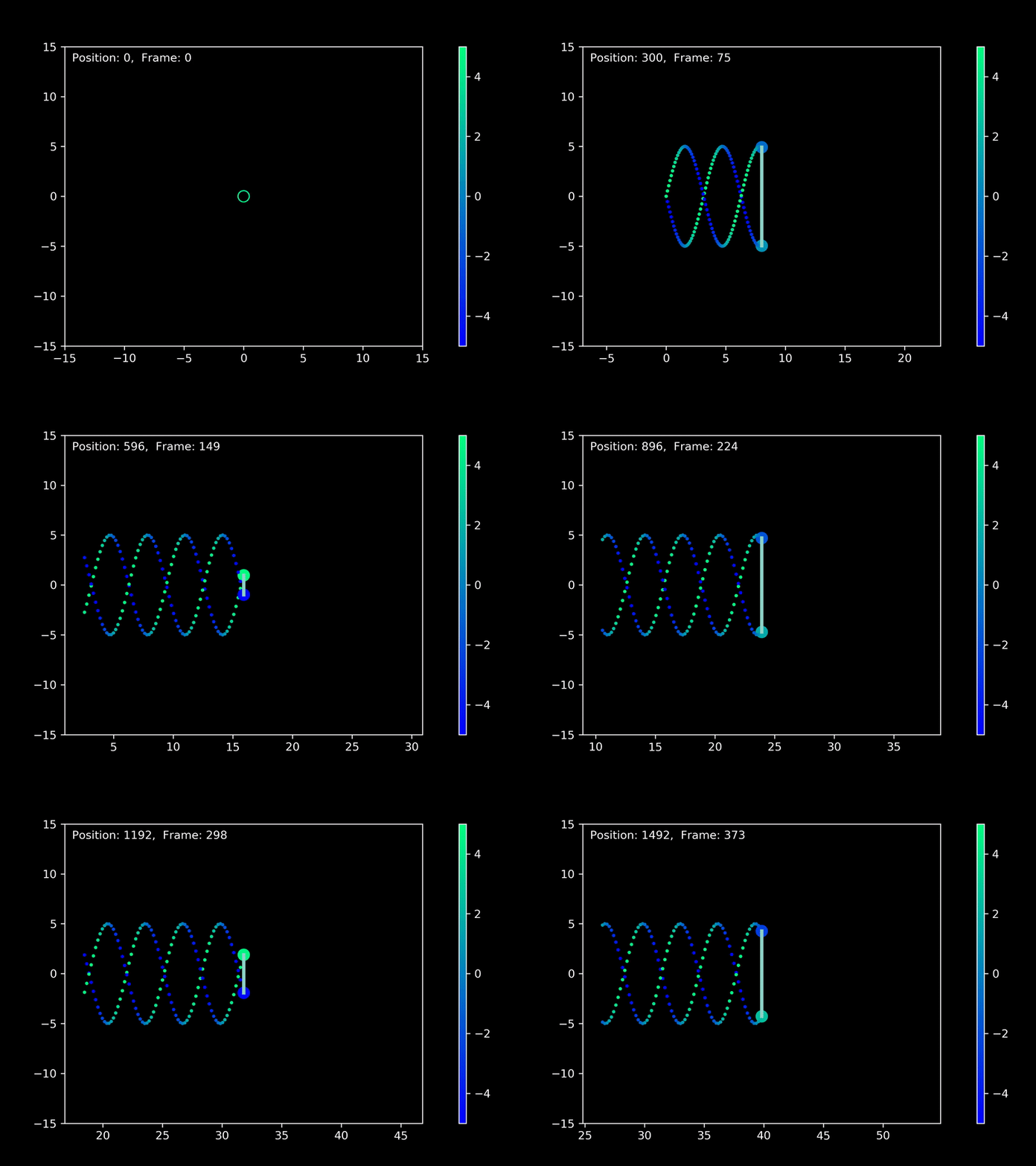
x1 = np.linspace(0,40,1500)
y1 = -5*np.sin(x1)
dydx_1 = -5*np.cos(x1)

x2 = np.linspace(0,40,1500)
y2 = 5*np.sin(x1)
dydx_2 = 5*np.cos(x1)

Traj = trajectory()
Traj.plot3D(x1,y1, dydx_1)
Traj.plot3D(x2,y2, dydx_2)
Traj.ShowAnimation(with_color = True, z_axis=[-5,5], link_data = [[1,2]])
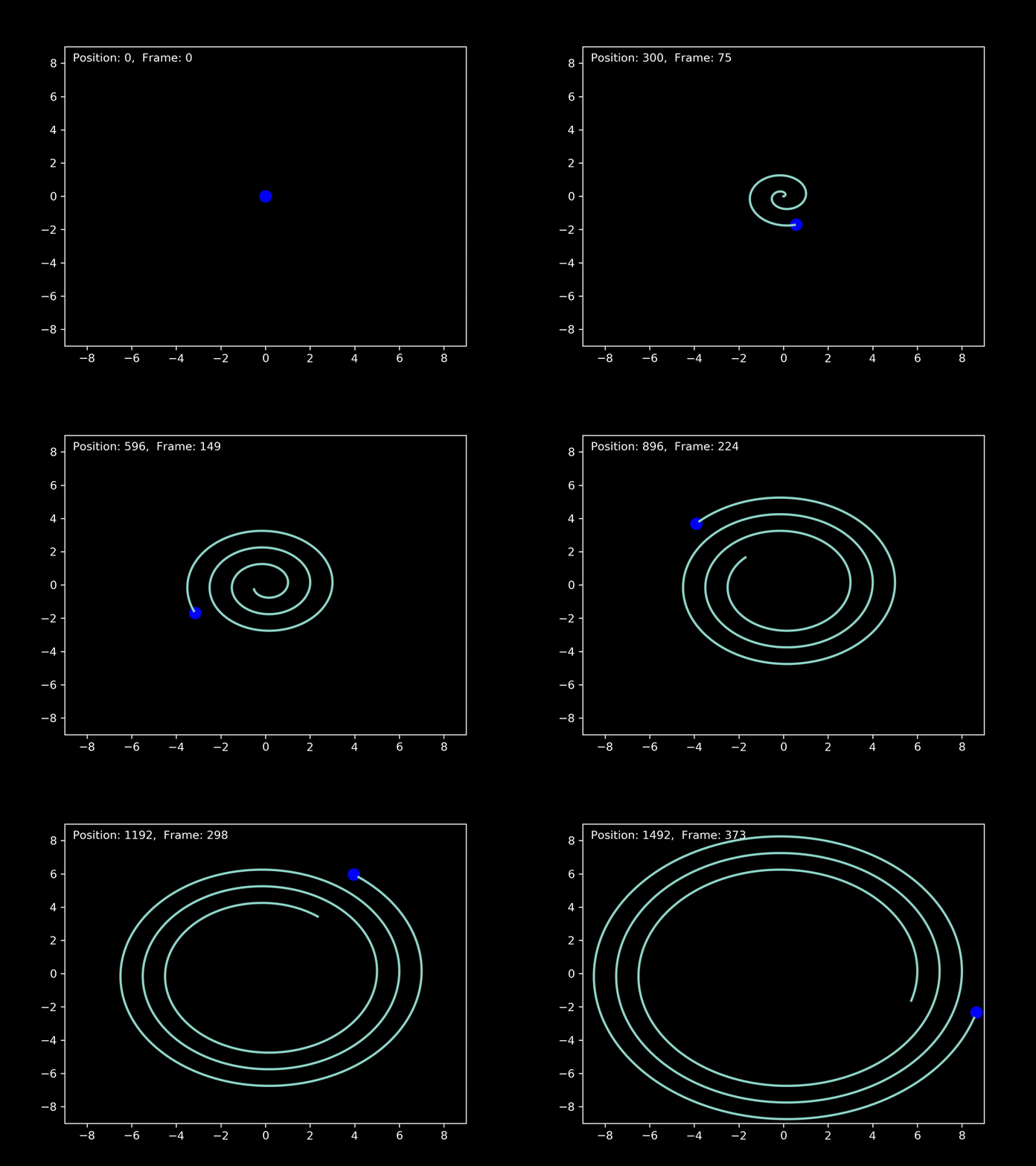
theta = np.linspace(0,18*np.pi,1500)
r = np.linspace(0,9,1500)

x = r*np.cos(theta)
y = r*np.sin(theta)

Traj_2 = trajectory()
Traj_2.plot3D(x,y)
Traj_2.ShowAnimation(follow_mass = -3, size = 9)
Traj_2.ShowStatic(with_color = True)
